
Small work often waits behind large projects. A planner can spend more time waiting for a requested SAP export than reviewing what it should reveal.
Small SAP tasks are worth automating only when access, permission and oversight are already in place. Business users can take initiative within approved permissions and scripting. That distinction keeps a technical experiment tied to a real business question and a reviewable outcome. The person who understands the report, its filters and its business meaning can help shape a narrowly scoped tool, while IT and security decide whether the route is allowed, supported and bounded.

Start with the first connection, not a grand transformation
A useful first experiment may be a recurring stock report, an open order export or a daily shortage review. These are candidate tasks, not promises of automatic success. Start with read-only reporting in an approved test environment, with a supervisor able to watch the run and stop it safely.
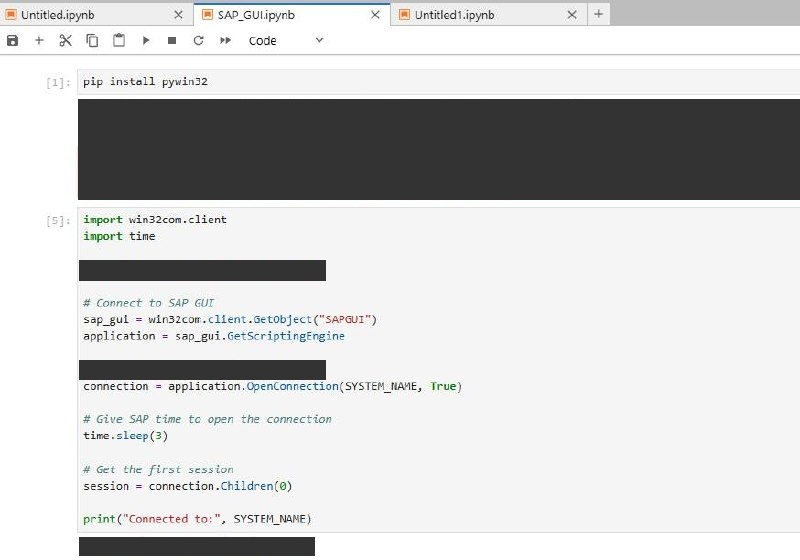
On Windows, Python with pywin32 can access SAP GUI’s COM scripting interface. A script can use GetObject('SAPGUI') to attach to a running SAP GUI or SAP Logon instance, call GetScriptingEngine, and use OpenConnection(SYSTEM_NAME, True) for a named SAP Logon entry. SYSTEM_NAME is that entry’s description, not a password, and the call does not supply credentials. The script must still handle authentication and session state required by the environment: reaching the GUI object or issuing the connection call does not prove login or report access. True waits until the connection is established or an error is detected; it does not prove successful authentication. Validate the first session before acting.
There is another easy trap. connection.Children(0) selects the first session, which is unsafe when several connections or sessions are open. A responsible script validates the intended environment and session before acting. A mismatch should stop the run rather than turn a harmless export into a confusing or damaging interaction.
What a screenshot proves, and what it does not
The accompanying redacted screenshot is an illustration of connection code: a Windows Python win32com sequence and a visible print statement, with its output redacted. It is not evidence of a completed connection, authenticated transaction, report automation or productivity measurement. Internal names and paths are absent.
GUI scripting is available only where client support is installed and enabled, server scripting is enabled by an administrator, and local policy permits it. Existing transaction and data authorizations still apply. Automation cannot bypass authorization, grant access, or override limits on sessions, reports and export locations.
Do not bypass disabled scripting, suppress security prompts or change server and registry controls to make an experiment run. No passwords belong in notebooks or scripts. Use company-approved authentication or approved SSO where available, and approved secret management when genuinely needed. Keep logs free of credentials, confidential rows and unnecessary personal data.
Imagine a planner who checks a shortage report each morning. The repetitive part is selecting parameters and exporting data; the harder judgment is choosing a safe date range, plant and material scope. A small script could help if parameters are reviewed, the run is supervised and the output is compared manually. If the screen changes or an unexpected dialog appears, stop and investigate instead of adding blind clicks. The planner’s knowledge remains part of the control.
Govern the useful boundary
Before a first run, define the target environment, report, date range, expected row count and expected totals. Compare the generated file with a manually produced sample. Check columns and filters, and ensure no confidential export goes to a personal device or unapproved service. Preserve notices and data handling restrictions.
Keep the scope small. Read-only reporting does not update business data; it is not a server read-only scripting mode, which may restrict field entry. Production postings, mass changes and write actions deserve a higher bar. Set a business owner, an operational stop rule and a clear handover.

Screen automation is brittle because it depends on layouts, control identifiers, dialogs and timing. A minor SAP GUI change can break a selector. A usable solution needs documentation, a named owner, dependency and environment notes, logs that exclude sensitive data and a maintenance path. State what happens when a screen is unexpected. A test that stops cleanly is more useful than one that keeps going while nobody understands its state.
Business users should own the process logic: what the report means, which parameters are valid and how an output is checked. IT and security should govern enablement, architecture, authentication and operational boundaries. For shared, unattended, write-heavy, high-volume or business-critical work, involve IT and evaluate supported SAP APIs or integration routes. Do not assume every SAP report has an API, or use GUI scripting for a larger integration simply because it worked in a small test.
Choose one repetitive report, document its business rules, request the approved scripting path and test only a read-only export under supervision. Review it with the report owner and security stakeholders. If it remains safe and supportable, improve it incrementally. If it crosses the boundary, hand it to IT with clearer requirements, ownership and failure behavior.